From inquiry to support – all within one system

brokercare360 is the CRM for insu­rance bro­kers in one sys­tem: mar­ke­ting, sales and ser­vice for your law firm, hos­ted in Germany.

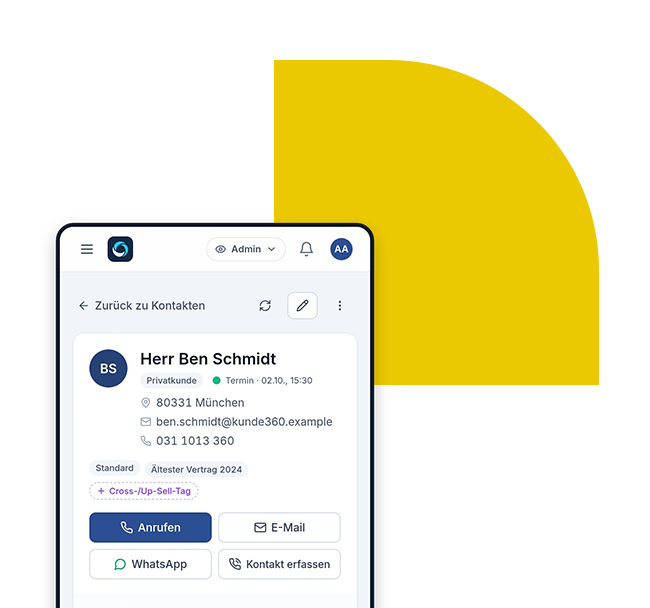
Customer file in brokercare360 on the smartphone (demo data)

Inqui­ries come by form, by e‑mail and on the pho­ne. One per­son con­ducts the initi­al mee­ting, ano­ther advi­ses, and the ser­vice depart­ment lear­ns about the deal from an e‑mail. What the cus­to­mer has alre­a­dy said is asked again – and how much is curr­ent­ly in the pipe­line is an estimate.

brokercare360 puts this into a pro­cess: The law fir­m’s web­site deli­vers leads, the lead beco­mes a deal in the pipe­line, the con­clu­si­on beco­mes a con­tract in the cus­to­mer file, and later con­cerns end up as a ticket to the ser­vice depart­ment. This way, ever­yo­ne in the team can see whe­re a cus­to­mer stands and what is next.

brokercare360 com­ple­ments your bro­ker manage­ment pro­gram: Offers, appli­ca­ti­ons, docu­ments and bro­kera­ge bil­ling remain whe­re they are today. brokercare360 mana­ges inqui­ries, sales, com­mu­ni­ca­ti­on and support.

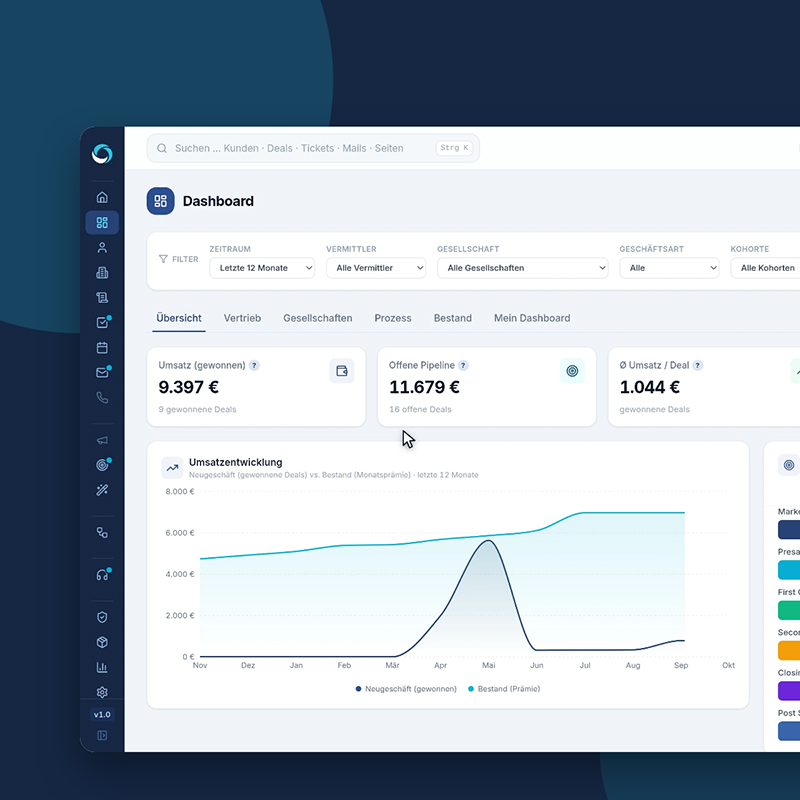
Dashboard in brokercare360: Revenue, open pipeline and funnel per stage (demo data)

Why an end-to-end process determines your sales success

Inte­res­ted par­ties expect a quick respon­se – and not ques­ti­ons that they have alre­a­dy ans­we­red. If enqui­ries, han­do­vers and sup­port con­ver­ge in one sys­tem, ever­yo­ne in the team works with the same sta­tus, and no enquiry remains in the inbox.

  • Requests from your web­site come into the sys­tem with page and campaign
  • Clear hand­offs bet­ween Set­ter, Clo­ser and Service
  • Pipe­line and expec­ted reve­nue at a glance

One system for the entire journey to the customer

Logo brokercare360

Website and Leads

With the web­site buil­der, your law firm can design your own pages and landing pages. Every form auto­ma­ti­cal­ly beco­mes a lead – with the page and cam­paign from which it came. Dubio­us receipts await your decis­i­on as suspec­ted spam.

Customer file

Con­tracts, deals, tickets, needs ques­ti­on­n­aires and cont­act histo­ry are in one file. Health infor­ma­ti­on remains blo­cked until the cus­to­mer’s con­sent is noted.

Service and Tickets

Dama­ge reports and con­cerns beco­me tickets with num­ber and sta­tus. On the board, the ser­vice can see at a glan­ce what is new, what is wai­ting for the com­pa­ny or the cus­to­mer, and what has been resolved.

Sales pipeline with roles

Deals run through fixed pha­ses. Set­ter, clo­ser, and ser­vice each have their rou­te in the pipe­line. When the pha­se chan­ges, the tasks you have defi­ned for this pha­se are auto­ma­ti­cal­ly created.

Mailbox in CRM

Per­so­nal and team mail­bo­xes run in the CRM. You assign e‑mails to cus­to­mers, deals and tickets – and brokercare360 never dele­tes any­thing from your e‑mail provider.

Data protection and hosting in Germany

Ser­vers and back­ups are loca­ted in Ger­man data cen­ters, each law firm is sepa­ra­te in the data­ba­se, and each account logs in with a second fac­tor. The appli­ca­ti­on does not run any ana­ly­tics, adver­ti­sing, or AI services.

Marketing, sales and service – finally in one system

With brokercare360, your enti­re team works with the same level.

Marketing: Win inquiries

own web­site and landing pages from the con­s­truc­tion kit, forms that arri­ve direct­ly in the CRM, and the page and cam­paign that came from each lead. The man­da­to­ry infor­ma­ti­on assistant crea­tes tem­pla­tes for imprint, initi­al infor­ma­ti­on and pri­va­cy policy.

Sales: Manage deals

From the initi­al mee­ting to the clo­sing: Deals with pro­duct, com­pa­ny and con­tri­bu­ti­on, from which the expec­ted value accor­ding to your bro­kera­ge rates. The dash­board shows reve­nue gai­ned, open pipe­line and the fun­nel per phase.

Service: Customers hold

tickets for dama­ge and con­cerns, all con­tracts in the cus­to­mer file – and if a new need ari­ses, start the next deal direct­ly on the contract.

Ready to go in four steps

We set up brokercare360 tog­e­ther with you – with your data, your pha­ses and your team.

Step 1:
Demo

In 30 minu­tes via video, we show you the path from the inquiry to the cus­to­mer file – using demo data and with your questions.

Step 2:
Setup and Import

We set up your law firm and take over your port­fo­lio from your pre­vious sys­tem. In a pre­view you can see in advan­ce what will be taken over.

Step 3:
Train your team

In up to four online appoint­ments, manage­ment, set­ters, clo­sers and ser­vice get to know their work in the system.

Step 4:
Removal

With your web­site and landing pages, you can win new inqui­ries. As your team grows, you will gain more access or a lar­ger package.

Hourglass on a stack of paper

What you gain with brokercare360

  • Every request from your web­site is in the sys­tem with its source – not­hing gets lost in the inbox
  • Clean han­do­vers in the team wit­hout cus­to­mers ans­we­ring ques­ti­ons twice
  • A clear view of pipe­line, sales and goals
  • More time for your cus­to­mers becau­se the pro­cess is in the sys­tem ins­tead of in slips of paper and e‑mails

Check out brokercare360 in a demo!

In 30 minu­tes via video, we will go through the path with you from the inquiry to the cus­to­mer file – using demo data and with your ques­ti­ons. Then you deci­de whe­ther brokercare360 is a good fit for your law firm.

ComCare 360 is a certified brokercare360 partner.

We accom­pa­ny your law firm pro­fes­sio­nal­ly in the imple­men­ta­ti­on and opti­miza­ti­on. Our CRM experts ensu­re a quick start for dai­ly use and com­pre­hen­si­ve trai­ning of your team.

ComCare 360 GmbH - Call Center - brokercare360: Marketing, Sales, Service for Insurance Brokers - 1